1. Purpose & Scope
This best practice defines the standard process for handling DMRs (Debit Memo Requests) — the return of damaged or defective items to a supplier, the resulting credit memo, and the offset of that credit against the original purchase order in Epicor.
It applies to any organization unit that creates purchase orders, inspects incoming goods, or processes supplier credits, and is intended to be adopted as a repeatable standard across ERP Rescue engagements.
The process moves item return → credit memo → PO-linked offset, with each function owning a distinct stage so accountability stays clear and no single role is overloaded.
2. Roles & Responsibilities
| Role | Responsibility |
|---|---|
| Quality Control | Flags defective or damaged parts during inspection; enters the DMR request into Epicor, which triggers the downstream credit memo process. |
| Purchasing | Owns DMR creation and follow-up end-to-end: initiates the DMR, returns items to the supplier, and secures the credit memo. Serves as the escalation point when a credit memo arrives without a linked DMR. |
| Accounts Payable / Accounting | Last step in the process. Processes credit memos once purchasing and quality control actions are complete — not responsible for DMR creation, approval, or follow-up. Flags unlinked credit memos for purchasing to resolve. |
| ERP Process Owner | Point of contact for accounting-side questions and procedure clarifications; provides ongoing support after rollout. |
Accounts Payable should never be the gatekeeper for DMR creation or approval. This separation prevents AP from being overloaded with upstream tasks and keeps accountability with the functions that initiate the defect/return.
3. Process Workflow
The diagram below shows the standard flow from defect identification through audit-trail completion, plus the exception path for credit memos that arrive without a linked DMR.
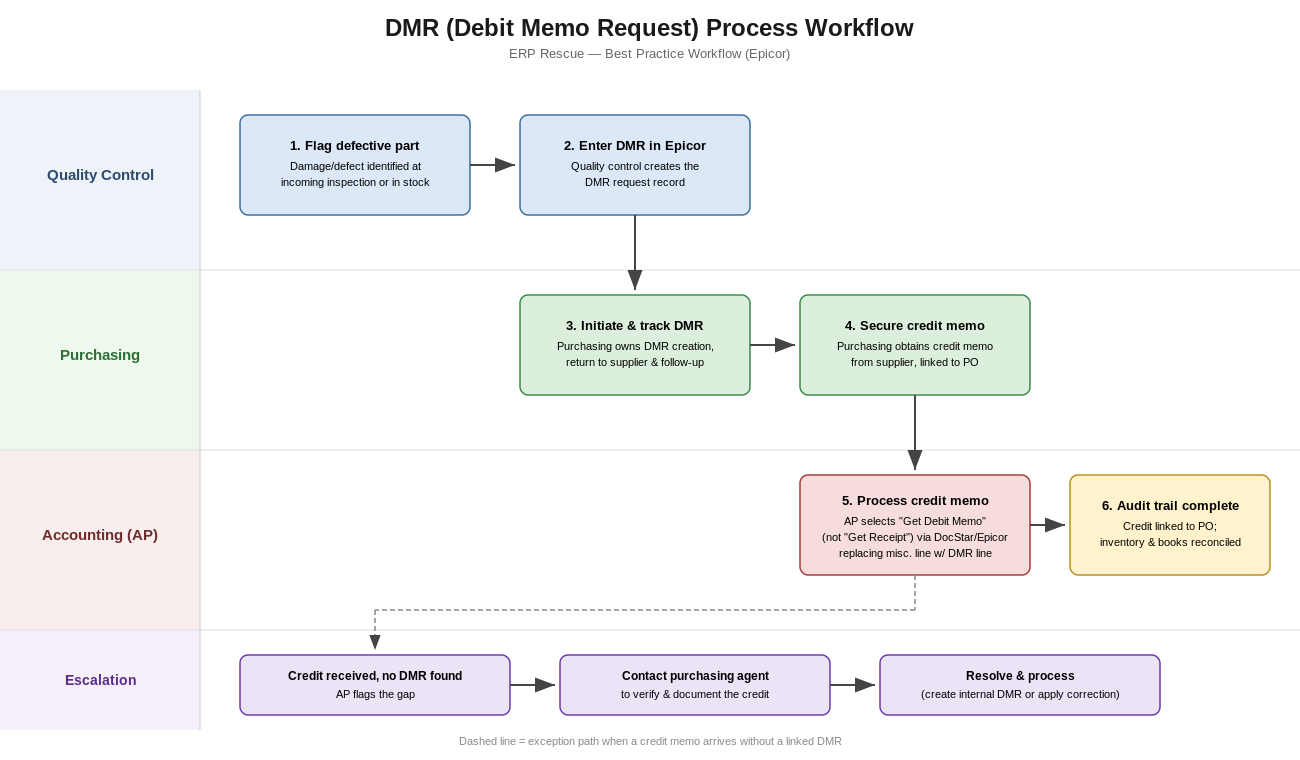
3.1 Standard Path
| Step | Action | Owner | Detail |
|---|---|---|---|
| 1 | Flag defective part | Quality Control | Damage or defect identified at incoming inspection or in stock. |
| 2 | Enter DMR in Epicor | Quality Control | Creates the DMR request record, which triggers the downstream credit process. |
| 3 | Initiate & track DMR | Purchasing | Owns DMR creation, returns the item to the supplier, and follows up until resolved. |
| 4 | Secure credit memo | Purchasing | Obtains the supplier's credit memo, ensuring it references the original PO. |
| 5 | Process credit memo | Accounts Payable | In Epicor, selects "Get Debit Memo" (not "Get Receipt"), replacing the miscellaneous line with the fetched DMR line. |
| 6 | Audit trail complete | Accounting | Credit is linked to the PO; inventory and books reconcile correctly. |
3.2 Exception Path: Credit Memo Without a Linked DMR
Many ERP systems (including Epicor) cannot debit individual part numbers directly, so unlinked credits default to miscellaneous processing — weakening the audit trail and complicating inventory accounting. When this happens:
- Accounts Payable identifies the credit memo has no associated DMR and flags the gap.
- AP contacts the purchasing agent to verify why and request the missing documentation.
- Purchasing either supplies the correct DMR reference, or the situation is resolved as a documented exception (e.g., a pricing correction with no DMR).
- AP processes the corrected/clarified entry, preserving the audit trail.
4. System Best Practices (Epicor)
- Do not rely on automated alerts for new DMRs unless explicitly configured — by default, monitoring is manual and depends on purchasing and quality control follow-through.
- Weigh notification automation against workload: adding alerts can improve visibility but may increase the processing team's workload if not scoped carefully.
- Validate DMR status reports in a Pilot/test environment before relying on them in production.
- Use "Get Debit Memo," not "Get Receipt," when applying supplier credits to a PO.
- Configure DMR credit lines to display linked purchase orders, simplifying matching during processing.
- Expect and budget time for rough edges during pilot testing; prioritize process clarity over technical perfection ahead of go-live.
5. Implementation & Rollout Guidance
| Milestone | Guidance |
|---|---|
| Go-live timing | Align go-live with the start of a fiscal period (e.g., new fiscal year) to avoid conflicts with year-end closing activities. |
| Early adoption | Expect low initial volume; prioritize flagged incoming-inspection defects and visible damages first. |
| Supplier/part prioritization | Identify key suppliers or part categories to prioritize for DMR flagging with input from purchasing leadership. |
| Week 1 post-launch | Expect initial DMR activity to appear within about a week of go-live; monitor closely during this window. |
| Ongoing | Use non-conformance processing within the ERP to centralize defect tracking, replacing offline handling of damaged items. |
6. Tools & Support
- Maintain a current End User Procedure (EUP) covering both supplier-issued credit memos and internally created debit memos for short payments. Update it as new questions arise.
- Use a Pilot/test environment to validate DMR status reports and confirm process readiness before go-live.
- Designate an ERP Process Owner as the point of contact for accounting questions and procedure clarifications; encourage early questions to prevent compounding errors.
7. Implementation Checklist
Accounts Payable / Accounting
- Review the current EUP for debit memo processing and confirm how to locate DMR status/reports in the test environment.
- Follow up with purchasing when credit memos arrive without an associated DMR, to verify and rectify missing documentation.
- Process received credit memos by replacing miscellaneous lines with fetched DMR lines during invoice application.
Quality Control
- Maintain the workflow for requesting/approving DMRs; coordinate with purchasing to ensure credits are valid and documented.
Project / Implementation Team
- Coordinate go-live timing around fiscal period boundaries, including readiness reviews and supplier/stakeholder communication.
ERP Process Owner
- Provide ongoing support and clarification to the accounting team on debit memo and DMR procedures, including EUP updates as needed.
Rolling This Out at Your Organization?
Our consultants help manufacturers stand up clean, repeatable Epicor processes like this one — from configuration through go-live support. Same-day response, no long-term contract required.